‏إظهار الرسائل ذات التسميات blogger theme. إظهار كافة الرسائل

الجمعة، 27 نوفمبر 2015

100 Times Fastest Technology In Networking is "LiFi":- Tests Prove

With speeds of 1GBps, the technology could enable a high-definition film to be downloaded in seconds


What is LiFi Then:-

LiFi is a disruptive technology which will shift business models and create opportunities ripe for
exploitation. The dominance and lifetime of LED lighting has created a need for new business models in the lighting industry. The need to offer services, including new payment and financing models, creates an unprecedented opportunity for LiFi.


Test Results: Li-Fi is 100 times Faster than Wi-Fi

An Estonian startup company called Velmenni took the technology out of the laboratories and into the real-world offices, and industrial environments in Tallinn for the first time and, believe me, it's really, really fast.


"We are doing a few pilot projects in different industries where we can utilize the VLC technology,"Velmenni's CEO Deepak Solanki told IBTimes UK.
"Currently we have designed a smart lighting solution for an industrial environment where the data communication is done through the light. We're also doing a pilot project with a private client where we're setting up a Li-Fi network to access the Internet in [our] office space."
 Who Invented Li-Fi ?

Li-Fi technology was originated in 2011 by Professor Harald Haas of the University of Edinburgh, who demonstrated that, with a flickering light from a single LED, he could transmit more data than a cellular tower. Professor Haas, delivered a TED talk about his technology in 2011, which has attracted more than 1.7 million views.



الثلاثاء، 8 سبتمبر 2015

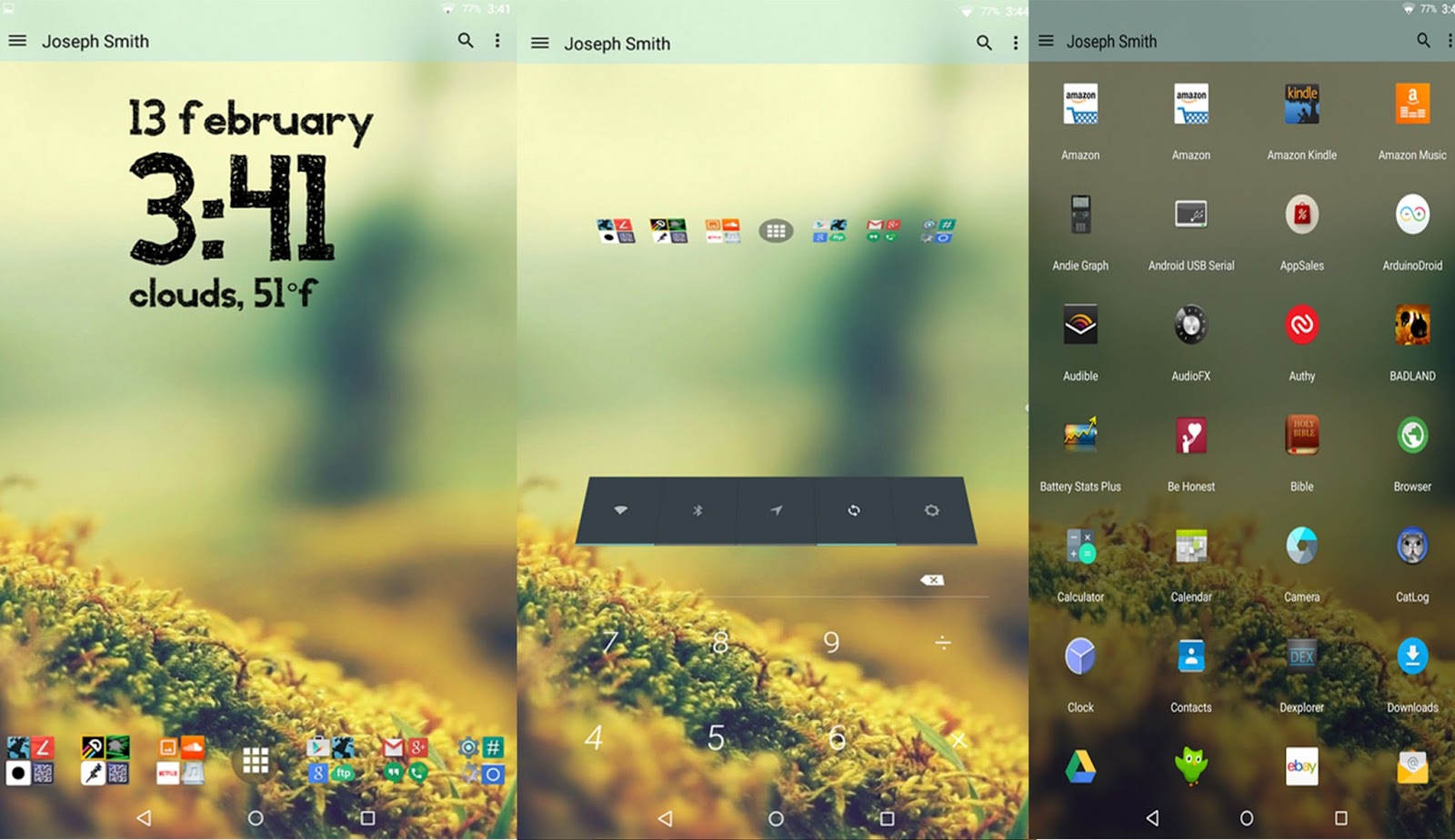
Mix and match icon packs in Lucid Launcher - Android Tips & Tricks

Use Icondy and Lucid Launcher to choose what icons you want to display


While icon packs are a great way to customise the look of your Android, they don’t always offer what you’re looking for. In this tutorial we’re going to show you how to use Icondy to mix together icon packs, giving you better control over the look and feel of your homescreen. It’s a pretty simple process, although at the moment the app only supports Lucid Launcher, which means if you’re using a different third-party launcher app you’re going to be out of luck. So to get started you’ll need to download Lucid Launcher, then you’ll need to grab Icondy from Google Play. There is a free version to play around with, so you’ll probably want to get that first to make sure everything works okay with your device. You can then buy the premium version as an in-app purchase if you want.


  • Get some icon packs 

First up you’ll need to have some icon packs installed. If you don’t have any, head to Google Play and search for Icon Pack. You’ll be given loads of results. Find a couple that you like and download them. When they’ve finished installing, head back to Icondy.

  • Create your own pack

Now it’s time to create your own icon pack. Tap on the orange plus sign in the bottom right-hand part of the screen. This will ask you to create a name for your new icon pack. Decide on something sensible, then tap OK to be taken along to the next screen.

  • Combine the packs

This screen offers a number of different options. First you have to select which icon packs you can use. With the free version of Icondy you can only use two packs at once, but if you upgrade to the premium version, you’ll be able to combine more.

  • Follow the instructions

Next select which of your icon packs you want to be the default, and choose a default icon. Then it’s time to blend your icon packs. Tap the button at the bottom and you’ll be show a list of all the icons that you’ve currently got on your device.

  • Save the pack

When you’ve finished choosing which icons you want to use for the different apps, it’s time to create your icon pack. To do this tap the tick in the top-right corner. Depending on how many switches you’ve made, it might take a while. Tap back when it’s done.

  • Apply the pack

Lastly, head back to the main page of the app. You’ll see your newly created icon pack displayed at the top of the page. Tap on the arrow-like icon next to the name of your pack, and then tap on Lucid Launcher to apply it. You’ll now have mixed icons.

Videos:-


الخميس، 3 سبتمبر 2015

Boost social presence by setting up a blog

A blog is essential for tying your social activities together

Blogs are seen by some as outdated, but they could not be more wrong. Consider what social networks do and how they work, and you will soon see that they are merely conduits for people to communicate on. A blog is yours alone and can be used in any way you like. From the design to the text to the way you bring all of your social elements together, it is a cost-effective way to build a presence and to truly show what you are capable of. Whether you create podcasts, produce fine art or anything else, a blog can be anything you want it to be and it is exceptionally easy to link to Twitter and Facebook accounts and to even host podcasts and images that you have produced. Many free web hosting options are available, but for a small monthly or yearly cost, you can take advantage of some truly stunning web software and design templates.

Steps to go:- 


1. Choose a provider


Research your blog host. Check online reviews and carefully consider your limitations. If you know you will struggle to design a site, look for hosts who offer professionally-designed templates and don’t choose on price alone.

2. A companion app


Try to choose a host who offers an Android app that is capable of letting you create blog posts that look the same as when created on a desktop. You will want to add images and even videos to offer a rich reading experience.

3. Write posts anywhere

You will now be able to create blog content whenever the mood strikes or when an interesting event occurs. Your Android device will let you dictate text and also capture photos and videos when mobile. It’s perfect for blogging at any time.

4. Make your posts social


The option to automatically add a social link to your latest blog post will either be available within the blogging software or through a freely available add-on. This will help you to quickly gain traffic which is consistent and repeating.

5. Quality in every post


Take time over every single blog post you publish. To gain readers who become loyal, and who are then more likely to follow you on social networks and listen to your podcasts, you will need to always produce quality content.