‏إظهار الرسائل ذات التسميات Guides. إظهار كافة الرسائل

الاثنين، 23 نوفمبر 2015

Bypass Huawei Android Google Verify Account Aka Huawei FRP Lock Remove Solutions


Huawei FRP (Factory Reset Protection) Removal Tool (Official)


Today I Am Going To Share A Very Unique and Most Wanted Solution To Bypass Huawei Android Google Verify Account.This Problem Come After Hard Reset In New Phones Specially Lollipop Firmware.

This Problem See Like Below Image:

All Process only on Fastboot mode


  • Install USB driver 
  • Apply to windows XP、WIN7
  • Apply to U9510、H882L and so on that Android mobile
  • It just support only one phone,you can‘t connect more than one phone every time.
  • software install: Just uncompress the file to your PC, and then you can use it.


الجمعة، 20 نوفمبر 2015

X.P Psiphon Lite - Free Internet on Moblink - Ufone - Warid - Telenor - Zong - 2016 - Download Now


X.P Psiphon Lite

Download Now

Free 3G Internet Jazz / Mobilink 2016
Free 3G/4G Internet Warid 2016
Free 3G/4G Internet Zong 2016
Free 3G / 4G Internet Telenor 2016
Free 3G Internet Ufone 2016

Free Internet On Android Phone 2016 - How To
 Download Now PSIPHONE Handler VPN

Qmobile Noir X2 Hard Reset / Factory Reset - Remove Pattern Lock - Fix Hang On Logo - Guide


Qmobile X2 Hard Reset

Note:  All the user data will be removed when we apply hard reset .

Instructions:


  • Press Volume up  + Volume down  + power button together until u see two options on screen (see pic)


  • Now Press Volume Up Key To Select Recovery Mode
  • Now U Will See No Command Screen
  • Press Power Button To Get Recovery Options (see pic below)


  • Select "wipe data / factory reset " using volume down key and then press option key to confirm


  • now select "yes -- delete all user data" using volume down button and press option key to confirm


  • now wait for complete reset
  • after press option key again to reboot phone to normal
  • congrats u done

Qmobile Noir V2 Hard Reset / Factory Reset - Remove Pattern Locks - Fix Boot Loop - Guide


Qmobile Noir V2 Hard Reset

Instructions:


  • Battery Must Be Charged Fully
  • Turn Off Your Phone Completely
  • Press Volume up + Volume down + Power buttons together until u see no commands screen with android logo
  • now press power button , after u will see two options in screen (see pic below)


  • Press Volume Up To Select Recovery Mode
  • now u will see recovery mode options (see pic below)


  • Now Select "wipe data/factory reset" option using volume down key
  • now press option key to confirm (see option key in below pic)


  • after u will see some option (see pic below)


  • now select "yes -- delete all user data" using volume down key and press option key to confirm
  • after compete now reboot ur phone to normal
  • enjoy all done


QMobile X2i 3G Hard Reset / Factory Reset - Remove Patteren Locks - Fix Boot Loop - Guide


Qmobile X2i 3G Hard Reset

Why Hard Reset Your X2i 3G ?
with Hard Reset U Can:

  • Remove Pattern Lock
  • Remove Security Locks
  • Remove Password or Pin Locks
  • Fix Hang On Logo or Boot loop Problem
  • Remove Google Account / too many Pattern Problem

warning: all userdata will delete after hard reset


How To Hard Reset ?


  • Your Phone Battery Must Be Charged At least 30%
  • Turn Off Your Phone Completely
  • Press and Hold Volume Down Button and then press power button until u see mobile light on but no display
  • now release power button.after 15 seconds u will see two option in mmi test mode:
  • now click on SMT option


  • After Click On SMT Option U Will See Some Options (See Below Pic)


  • Now Select Last Option "Restore the factory settings"
  • Now Again Click On Restore The Factory Settings (From Next Window) .
  • You Are Done now your Qmobile X2i 3G will restart automatically.


photo credits : mobile Flickr

الجمعة، 13 نوفمبر 2015

Bypass HTC Google Verify Account / Remove FRP Lock From All HTC Android Devices By AGS

What Is FRP ?

Android Factory Reset Protection (FRP) is a new feature to protect your device which has been added to several Samsung devices that are running Android OS 5.1 or higher.

This feature allows you to set up your device to prevent other people from using it if it's been reset to factory settings without your permission. For example, if your device is lost, stolen, flashed, or wiped, only someone with your Google account or screen lock information can perform a factory data reset and use the device.

When a device is factory reset, the device will not be able to be setup without the user entering the Google Account associated with the device (for hard reset) or screen lock information (for reset in Settings menu).


Instructions: 


  • Make S-Off Phone First ( Phone Must Be S-OFF )
  • Download ADB&Fastboot Drivers From Here
  • Extract the file 
  • Now Run CMD.EXE As A Admin


  • Connect Phone In Fastboot Mode and Install Required Drivers
  • Now Write This Command In CMD "fastboot erase frp"


  • Hope This Help U :)

http://www.all-gsm-solutions.xyz

الأربعاء، 4 نوفمبر 2015

Bypass Any LG Google Verify Account


First of all extract the file and put file below in micro sd and insert in ur phone then make it ON.

on the first screen u can see the language option and accessibility now go to accessibility

accessibility>switch access>make it on>settings>key combo for overview>press volume down and click ok..
then go back to accessibility>vision>talkback>settings>privacy policy.

You can see the browser then press volume down >dual WINDOW> click to file manager install the app that you put in micro sd and open it. now you can see the settings than go to backup & reset and reset your phone DONE.

If you can't see reset option on backup & reset than go back than go to users create new user then set it up then come again to owner then go to backup & reset now u can see the reset OPTION NOW u can reset ur phone DONE....


Watch Video Guide Here

Htc Enable Arabic and All Languages [Only For Rooted Devices]

Htc Enable Arabic + All languages Only for Rooted Device

Note: Not supported all devices just give a try

Instuctions :


  • Device Must Be Rooted
  • Install Root Explorer
  • Open root explorer make backup default.xml frm below given path 

system/customize/CID/default.xml

  • Download Below given edited default.xml file
  • Copy to system/customize/CID/ replace it
  • Reboot your device
  • Enjoy [Test and Comment Results]


Download default.xml


2nd Way :


  • Root Your Device
  • Install Region Changer From PlayStore


source:gsmhosting.com

HTC M9 Phone Disabled By EE [Full Solutions]


HTC M9 Disabled By EE [ Solutions ]

Instructions :


  • Install Latest Build Of TWRP  recovery then Root Your Phone.
  • Now Boot Your Phone in TWRP Recovery and Use These Commands To Wipe Perisist Partitions


adb shellmke2fs /dev/block/platform/f9824900.sdhci/by-name/absolutedd if=/dev/zero of=/dev/block/platform/f9824900.sdhci/by-name/absolute


 mke2fs /dev/block/platform/f9824900.sdhci/by-name/persistdd if=/dev/zero of=/dev/block/platform/f9824900.sdhci/by-name/persistexit

Good Luck Every One :)

السبت، 31 أكتوبر 2015

HTC Desire 526g+ MT6592 Stock Firmware + Guide


Build: 1.05.720.1 Asia WWE

Download :


  • Sp Tool Flash File Here
  • SD Card Flash File Here
  • Small OTA Zip Here

Procedure Via Spflash Tool :

  • Extract spflash tool file
  • Load scatter file
  • Press Download Hold both vol keys nd connect vit usb

Procedure via Recovery :
  • Copy SDcard flash file to SDcard then Boot into recovery mode update the zip.
Procedure via Fastboot :
  • Copy system-signed.img,userdata-sign & boot-signed-img files to adb
  • fastboot Driver folder and run below given commands.
fastboot flash system system-sign.img
fastboot flash boot boot-sign.img
fastboot flash userdata userdata-sign.img

الثلاثاء، 27 أكتوبر 2015

Xiaomi Global stable MIUI 7 ROMs for Mi3,Mi4,MiNote,Redmi1S,Redmi2,Redmi Note etc


Global Stable MIUI 7 Released For 


  1. Mi 3 
  2. Mi 4, 
  3. Mi Pad
  4. Mi Note 
  5. Redmi 1S 3G 
  6. Redmi Note 4G 
  7. Redmi 2/ Prime

Build version: V7.0.2.0.KXFMICI

                               Download ROMS [Direct Links]


Mi 3 / Mi 4     --------> Mi 3 | Mi 4- V7.0.5.0.KXDMICI (840MB)

Mi Note  ----------> Mi Note- V7.0.5.0.KXEMICI (887MB)

Redmi 2 (4G) / Prime  ----------> Redmi 2 (4G) / Prime - V7.0.5.0.KHJMICI (828MB)


Redmi 1S (3G) ----------> Redmi 1S (3G) - V7.0.5.0.KHCMICI (856MB)


                               Download Flash Tool + Drivers

MiPhone Flash Tool From Here

Drivers From Here

                               Roms Installing / Flashing Tutorial 

U Can Install These Roms By Two Methods
1) Manually In Fastboot Mode 2) By Flash Tool In Fastboot Mode


Manually How-To  ?


  • Install MiPhone flasher 
  • You can find Required drivers in MiPhone flasher installed path
  • After Download firmware Extract it 
  • Change the extracted files extension to .rar nd extract again
  • Connect your Device in fastboot Mode
  • Run flash_all.bat file frm extracted Folder
  • Now Rom Installationt Will Start
  • Enjoy

By Flash Tool How-To ?

  • Run flash tool
  • Browse nd select the extacted flash file Folder
  • Connect yur device in fastboot mode
  • Press refresh in the flash tool 
  • After Your Device get detected by flash tool hit flash.
  • Now Wait For Complete Installation
  • Enjoy

If Need Any Help Comment Here :)

الجمعة، 23 أكتوبر 2015

Root Samsung Galaxy Grand Prime ( SM-G531H ) On 5.1.1 With Pre-Rooted Firmware - How To


Hello !

Today We Come Again With Exclusive Solution Of Rooting SM-G531H Aka Samsung Galaxy Grand Prime On 5.1.1 :)


Note : All User data Will Be Wipe . Backup Your Important Data First .This Pre-Rooted Firmware Of SM-G531 is Tested , But Still I Am Not Responsible For Any Cause Of Damage.Do At Your Own Risk.


This Method Is Only For Samsung Galaxy Grand Prime ( SM-G531H )

How TO ??


  • Now Simply Flash This Pre-Rooted Firmware In Download Mode Using ODIN Flasher.

HERE IS ODIN TUTORIAL


If Any Problem Comment Here

Dont Forget To Share

You May Also Like :

ROOT SAMSUNG GALAXY GRAND PRIME VE (SM-G531F) ON LOLLIPOP 5.1.1


Special Thanks To : masterRt1994

الأربعاء، 21 أكتوبر 2015

QTab Q1000 Hard Reset / Master Reset [ Only Here ] [ Guide ]


QTab Q1000 Hard Reset


  • Turn Off Your Tablet Completely.

  • Now Press Volume Up + Volume Down Together With Power Button For Few Seconds.\

  • Now U Can See Two Options On Screen ( Option 1 = Recovery Mode , Option 2 = FastBoot Mode)

  • Now Press Volume Up To Select Recovery Mode.

  • Now Press Volume Down.

  • Now U Will See Android Logo With "No Command " Text.

  • Now Press Volume Up To Get Recovery Options.

  • Now  Select  Wipe Data / Factory Reset From Recovery Options By Using Volume Down Button.

  • Now Press Volume Up To Confirm.

  • Now Select Yes -- Delete All User Data By Using Volume Down.

  • Now Press Volume  Up To Confirm.

  • Now Reset Procedure Will Strart.

  • After Reset Complete Now Press Volume Up To Reboot Your Tabled In Normal Mode.

  • Enjoy !


Need Help ? Comment Here


الثلاثاء، 20 أكتوبر 2015

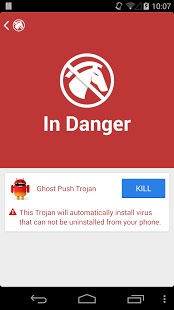
[ Full Solutions ] Remove Ghost Push Virus Aka Mokey Test , Time Service and Many Virues With This App.


One Click Monkey Test Virus Remover App. [Tested]


All Android Versions and Phones Supported ( Such As Samsung , Qmobile , LG and Many Other Brands )


How To Remove Virus ??

Download This App (Ghost Push Trojan Killer Apk )  From Here or From Google Play Store

After Download Now Install This App On Your Infected Android Phone

Now Open Installed App And Click On Scan (See Image Below)


This Will Scan All Viruses ,  Now Tap On Kill Button To Remove All Viruses (See Image Below)


Now Its Killing All Viruses (See Image Below)

Hurrey ! Now All Viruses ( Monkey test , time service etc etc ) Removed :)


Credits :

CHEETAH Mobile For Making This Awesome Tool

masterRt1994 For Making This Tutorial

الخميس، 15 أكتوبر 2015

Qmobile Noir Z8 Root [Kitkat v4.4.x] [Qualcomm]


Download Root Tool From Here


Instructions:

First of all you have to download and install adb drivers in your PC. Link given above.
Download the root package and extract it to desktop. or anywhere you like.
Now turn on USB Debugging in your QMobile Noir Z8 by going into Settings-> Developer Options-> and enable usb debugging.
Connect your phone with PC via USB cable.
Double-click on root z8......exe file and press any key on your pc.How to root Noir Z8
If you have drivers installed, your QMobile Noir Z8 will Reboot into custom recovery. This does not install the cwm recovery because the recovery image is not fully working.
When your phone boots into cwm recovery, press any key on your pc to continue.
Now your phone will start to show some weird colors but you don’t have to worry, its notmal. Just Press Volume down once and then press power button. Your phone will reboot and it should now be rooted.
Congratulations! You have successfully rooted your QMobile Noir Z8. You can check


الأربعاء، 14 أكتوبر 2015

[How-To] Jailbreak Your Iphone On IOS 9 (Windows) (ios 9.0.2) [Guide]


How To Jailbreak Your Iphone On IOS 9 (All Gsm Solutions)


Instructions To Jailbreak IOS 9 :


These are instructions on how to jailbreak the iPhone 6s Plus, 6s, 6 Plus, 6, 5s, 5c, 5, 4s on iOS 9.0 - 9.0.2 using Pangu9 for Windows...
If you aren't already at iOS 9.0.2 we suggest upgrading to the latest firmware using iTunes.


  •  Create an All Gsm Solutions folder on your desktop and download the latest version of Pangu into the folder. If your download is a zip file then extract the archive into the same folder.


  • Tap Settings from your Settings then select Touch ID & Passcode. Turn Passcode Off if it is enabled.


  • Press the Settings button at the top left to return to the Settings menu. Choose iCloud from the Settings menu then select Find My iPhone from the iCloud menu. Ensure the Find My iPhone switch is the Off position.


Return to the Settings menu by tapping the iCloud then Settings buttons at the top left of the screen. Then enable Airplane Mode by tapping the Airplane Mode switch.


  • Connect your iPhone to the computer via a USB cable, launch iTunes, and perform a manual backup. It is very important that you remember to backup your device before continuing as you could lose your data if the jailbreak process does not complete successfully.

  • Double click the Pangu executable from the All Gsm Solutions folder on your desktop to launch the application.


  • You will notice the device is detected by the software. Uncheck the PP checkbox then click the large Start Jailbreak button to begin your jailbreak.


  • You will be prompted to confirm that you've backed up your device and that it's in Airplane Mode, click the Already Did button (the one on the right) to continue.


  • The Pangu app will now begin the jailbreak process.


  • Your device will reboot and at the 65% mark, you will be asked to renable Airplane Mode.


  • At the 75% mark, launch the Pangu app from the Main Menu then tap Accept. When prompted tap OK to allow Pangu access to your photos.


  • Once the jailbreak has completed successfully, your iPhone will reboot and a Cydia app will appear on your Main Menu (SpringBoard).
  • *A big thanks to the Pangu team and all the others who contributed to this jailbreak.


Orignally Posted By : Iclarified

[Exclusive] ios9 Jailbreak Released By PANGU - More Info Inside + Download Now


                                           IOS 9 Jailbreak

GOOD NEW !

Today Pangu Release Jailbreak For ios 9 For Iphone / Ipad / Ipod.

Yes Its True :)

Currently Pangu Jailbreak Software Released Only For Windows. We  are Hoping That Software For OSX Will Release SOON

support : ios 9.0 to 9.0.2

Download From Here  

Pangu9 1.0.0 ( Win ) : Link 1    or   Link 2


Jailbreak Instructions : 

(Will Post Sooon)