السبت، 6 أغسطس 2016

Download iTEl 1702 Rom Pac File


Download iTEl 1702 Pac File
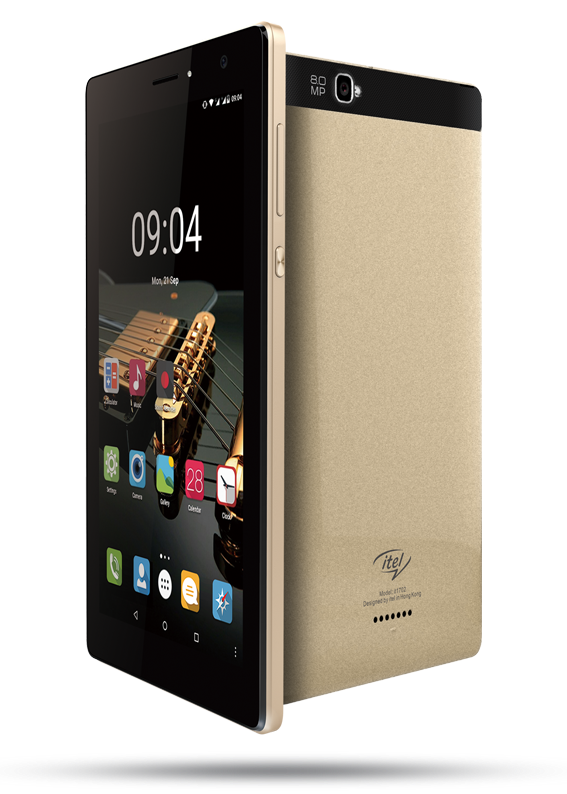


Download iTEl 1702 Pac File / Flasfile
Learn how to flash/unbrick iTEL 1702 Using researchDownload Tool From Here
iF you Encounter Touch Error after flash Download Second Variant

Specs
1.0GHz Quad-core Processor
1GB ram
HSPDA 900/2100
GSM 850/900/100/1900
Android v5.1 lollIpop
Dual SIM support functionality
Up to 100kpbs downloads speeds on 2G networks
Up to 42.57mpbs downloads speeds on 3G networks
WIFI Hotspot
Bluetooth v3.0,
Body
Touch Screen Keyboard
Option of Black,Red and white
Plastic body cover
Weight 150g
Sense Skin
Display
16M colours
5.0 inch Capacitive Touch Screen
Dimension(mm) of 190.50 x 109.78 x 102.0
Resolution of 600x1034
Memory
1GB RAM
Other Amazing Features
GPS support
No NFC
No Infred
No WIFI direct
No HDMI
No MHL
No 4G network
Java Support
A-GPS Navigation
WIFI Hotspot
Calculator
calender
Video Call
GPRS/EDGE/3G/Wi-Fi/3.75G internet connectivity
MP4/3GP video player with support for more codecs through third-party applications
Alarm
FM
MicroUSB 3.0
Browser support Flash
Accelerometer
Light Sensor
Proximity Sensor
Battery
Battery Capacity Li-ion 3000mAh
Talk Time 8hrs
Standby Time 250hrs


iTEL 1702 Stock Rom
Android
SPREADTRUM
IT1702-V605-20150930
Download Now

Download iTEl 1701 Pac File / FlashFile

Download iTEl 1701 Pac File


Download iTEl 1701 Pac File
Learn how to flash/unbrick iTEL 1701 Using researchDownload Tool From Here


iF you Encounter Touch Error after flash Download Second Variant


Specs
Body
SIM : Dual SIM, GSM+3G
Touch Screen : Yes
Colours : Black/Silver
Box Contents : Handset, Battery, Charger, USB Cable, User Manual, Warranty Card

Platform
Operating System : Android v4.4.2(KitKat)
Sensors : Accelerometer, Gyroscope, Proximity sensor

Hardware
Processor : 1.2GHz, Quad-core
RAM : 1GB
Storage
Internal Memory : 8GB
Expandable Memory : Yes, Up to 32GB

Display
Screen Size : 7 inches
Screen Resolution : 600 x 1024pixels

Camera
Rear Camera : Yes, 8MP, Auto focus,Flash
Front Camera : Yes, 5MP (Flash) LED
Zoom : Yes, Digital Zoom
Camera Features : Auto Focus

Battery
Capacity : 3100 mAH, Li-ion
Talk Time : Up to 15Hours(2G)
Stand By Time : Up to 200 Hours(2G)

Internet & Connectivity
GPRS : Yes
EDGE : Yes
3G : Yes, HSDPA, HSUPA
Wi-Fi : Yes, Wi-Fi 802.11
Bluetooth : Yes
GPS : Yes, with A-GPS, GPS
USB Connectivity : Yes, USB Port, USB 2.0, microUSB

Multimedia
Loudspeaker : Yes
Audio Jack : 3.5 mm

iTEL iT1551 Stock Rom
Android
SPREADTRUM
Itel-1701-V600-20150625
Download Now

الجمعة، 5 أغسطس 2016

DOWNLOAD BLU Studio 5.0 C BLU_D536L_V01 STOCK FRIMWARE

DOWNLOAD BLU Studio 5.0 C BLU_D536L_V01 FIRMWARE / FLASH FILE


DOWNLOAD BLU Studio 5.0 C BLU_D536L_V01 FIRMWARE / STOCK ROM
Learn how To flash BLU Studio 5.0 C BLU_D536L_V01 with SP flash tool from here


  Info:
  id:ALPS.KK1.MP7.V1
  version:4.4.2
  model:BLU STUDIO 5.0 C
  brand:BLU
>>manufacturer:BLU

BLU Studio 5.0 C BLU_D536L_V01


'Learn how to flash / Unbrick  BLU Studio 5.0 C BLU_D536L_V01 MT6572 Below

Extract SP Flash Tool and launch.

Now click scatter-loading button so that flash process can begin.

locate the scatter file of the device. It will be inside the folder of the rom you downloaded. 

Untick Preloader (not really necessary but a great precaution) tick this if the device is completely DEAD. 
Please make sure you untick DSP_BL if found on the list shown in SP Flash Tools especially when trying to flash devices with older chips like mt6572, mt6577 etc 

Now click download button. 

Power off the device and remove battery (if battery is built in don't worry just continue ). 

Most new devices now require battery for flashing. 

Connect the device to the computer with USB and wait for SP Flash Tool to detect it. 

Hold volume down or volume up button and connect the device for easy detection. 

Once phone is detected a red line will be seen at the bottom followed by a yellow line. 

When flashing is completed, a green tick is shown on the screen. Older versions of so flash tool will show a green circle. 

Insert battery back into the phone and reboot device

الخميس، 4 أغسطس 2016

DOWNLOAD LG V10 CLONE MT6572 FIRMWARE

DOWNLOAD LG V10, G10 CLONE MT6572 FIRMWARE

DOWNLOAD LG V10 CLONE MT6572 FIRMWARE / FLASHFILE
Learn How To flash LG V10 CLONE MT6572 from here


Download LG V10 MT6572 Clone ROM 

  Info:
  id:ALPS.KK1.MP7.V1.7
  version:4.4.2
  model:V10
  brand:V10
>>manufacturer:V10


'Learn how to flash / Unbrick  lg v10 mt6572 clone below

Extract SP Flash Tool and launch.

Now click scatter-loading button so that flash process can begin.

locate the scatter file of the device. It will be inside the folder of the rom you downloaded. 

Untick Preloader (not really necessary but a great precaution) tick this if the device is completely DEAD. 
Please make sure you untick DSP_BL if found on the list shown in SP Flash Tools especially when trying to flash devices with older chips like mt6572, mt6577 etc 

Now click download button. 

Power off the device and remove battery (if battery is built in don't worry just continue ). 

Most new devices now require battery for flashing. 

Connect the device to the computer with USB and wait for SP Flash Tool to detect it. 

Hold volume down or volume up button and connect the device for easy detection. 

Once phone is detected a red line will be seen at the bottom followed by a yellow line. 

When flashing is completed, a green tick is shown on the screen. Older versions of so flash tool will show a green circle. 

Insert battery back into the phone and reboot device

الثلاثاء، 2 أغسطس 2016

Download X-BO X9 Stock ROMs / Firmwares


DOWNLOAD X BO X9 FLASH FILE / FIRMWARE
DOWNLOAD X-BO X9 STOCK ROMs / Firmwares
LEARN HOW TO FLASH / UNBRICK X-BO X9 FROM HERE

X-BO X9 FIRMWAREs
Android 5.1

X-BO X9 MT6580

X-BO X9 MT6580 

X-BO X9 MT6580 V1.0.4

X-BO X9 MT6580 V1.0.3

X-BO X9 MT6580 V1.0.2

X-BO X9 MT6580 V1.0.1


'Learn how to flash / Unbrick X-BO X9 below

Extract SP Flash Tool and launch.

Now click scatter-loading button so that flash process can begin.

locate the scatter file of the device. It will be inside the folder of the rom you downloaded. 

Untick Preloader (not really necessary but a great precaution) tick this if the device is completely DEAD. 
Please make sure you untick DSP_BL if found on the list shown in SP Flash Tools especially when trying to flash devices with older chips like mt6572, mt6577 etc 

Now click download button. 

Power off the device and remove battery (if battery is built in don't worry just continue ). 

Most new devices now require battery for flashing. 

Connect the device to the computer with USB and wait for SP Flash Tool to detect it. 

Hold volume down or volume up button and connect the device for easy detection. 

Once phone is detected a red line will be seen at the bottom followed by a yellow line. 

When flashing is completed, a green tick is shown on the screen. Older versions of so flash tool will show a green circle. 

Insert battery back into the phone and reboot device

Download X BO N2 FlashFile / Firmware

DOWNLOAD X-BO N2 FLASH FILE FIRMWARE


learn how to flash / unbrick x bo n2 from here
x-bo n2 Stock Rom / firmware download
x-bo n2 mt6572
pass=> mi


'Learn how to flash / Unbrick X-BO N2 below

Extract SP Flash Tool and launch.

Now click scatter-loading button so that flash process can begin.

locate the scatter file of the device. It will be inside the folder of the rom you downloaded. 

Untick Preloader (not really necessary but a great precaution) tick this if the device is completely DEAD. 

Please make sure you untick DSP_BL if found on the list shown in SP Flash Tools especially when trying to flash devices with older chips like mt6572, mt6577 etc 

Now click download button. 

Power off the device and remove battery (if battery is built in don't worry just continue ). 

Most new devices now require battery for flashing. 

Connect the device to the computer with USB and wait for SP Flash Tool to detect it. 

Hold volume down or volume up button and connect the device for easy detection. 

Once phone is detected a red line will be seen at the bottom followed by a yellow line. 

When flashing is completed, a green tick is shown on the screen. Older versions of so flash tool will show a green circle. 

Insert battery back into the phone and reboot device

Download Miracle Box 2.36 Update Spd Frp Reset Added


Miracle Box 2.36 Update Spd Frp Reset Added 
HTC Sprinit Unlock And So Many features

Miracle Box with Miracle Key Dongle is
 all-in-one servicing solution specially designed to work with a wide range of Chinese mobile phones. Miracle Box allows its owner to perform phone flashing and mobile unlocking procedures as well as other software repair operations with devices based on supported CPUs.
Miracle Box - Outstanding Features:Repair IMEI without flashing
Huge flash files archive
World's biggest CPU database
Support for MTK 6252/6253 CPU
Support for MSTAR latest CPUs and others
Auto repair IMEI
Auto pin finder feature
Auto update feature
Multilingual software interface
Miracle Box - Supported CPUs:
SPD
CoolSand
MTK
MSTAR


Miracle Box 2.36 Update Spd Frp Reset Added 
HTC Sprinit Unlock And So Many features

Miracle Box 
v2.36 Released on 1st Aug 2016
HTC Sprint Unlock, SPD Android Frp Reset

Whats new on Version 2.36
1.MTK Improve Repair IMEI (BT Mode) (World' First)
2.MTK Improve Write Preloader Add Erase before write
3.MTK Improve Read/Format (Android)
4.MTK Improve Fix DL and MT6582 Read Pattern/PhoneBook
5.SPD Add FRP Reset in Format
6.SPD Improve Read Add "Skip Userdata" (Android)
7.HTC Add HTC Sprint Phone Unlock
8.Software fix some bugs

                                 Download Miracle Box 2.36       => Download Now

                                Download Miracle Box Driver     => Download Now